Protect your personal information
We'll never ask for your passwords, PINs, one-time codes, KeepSafe questions or card details by phone or email. If you're suspicious, stop the communication immediately and contact us on 0800 113 355.
Latest scams
Last updated: 13 October 2026
Impersonation scams: Phone calls & messages
We continue to see phone scams targeting customers, claiming to be from Kiwibank. These calls can come from 0800, local, private, overseas numbers or through WhatsApp and ask you for your banking login details, passwords or authentication codes. We’ll never ask you to:
- say your passwords or one-time codes out loud
- repeat back a one-time code to "block a payment being made"
- download any software or app onto your phone or computer
- transfer your money to a 'safe account' to protect it
- ask you to buy gift cards as a means of protecting your money.
We’ll always verify your identity in other ways to ensure your personal information and accounts are kept safe.
WhatsApp & messaging apps
We're seeing an increase in scams where scammers pretend to be from Kiwibank and contact people through messaging apps like WhatsApp.
These messages may have a Kiwibank logo and claim there's suspicious activity on your account, that your banking has been compromised, or that they need to help you protect your money. Scammers often create a sense of urgency to pressure you into acting quickly.
Be cautious if you're contacted through WhatsApp or another messaging app by someone claiming to be from Kiwibank.
Kiwibank call verification
If you receive an unexpected call from Kiwibank, you may also get a notification in the mobile app or internet banking confirming the call is genuinely from us. If someone calls you and cannot verify they're a Kiwibank representative, hang up immediately and call us on 0800 113 355 (or +64 4 473 1133 from overseas).
Impersonation scams: Phishing & smishing
Scammers are sending text messages, emails and making phone calls that appear to come from trusted organisations such as NZ Post, NZTA, Inland Revenue (IRD) and Kiwibank. These messages can look genuine, and with the increasing use of AI, scams are becoming more convincing and harder to spot.
Many of these scams include a link to a fake website or form designed to steal your personal or banking information. Be cautious of unexpected messages and avoid clicking links unless you're certain they're legitimate. If you're unsure, contact the organisation directly using trusted contact details.
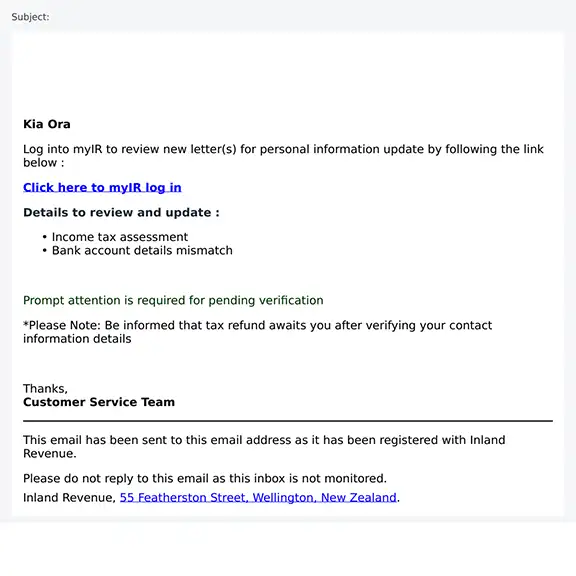
Inland Revenue (IRD) refund scam
We've received reports of phishing emails pretending to be from IRD. These emails claim you have a tax refund waiting and ask you to log in to myIR using a link provided in the email. This link leads to fraudulent websites designed to steal your login details and personal information.
The emails include links to websites designed to collect your IRD login details and personal information. Do not click any links or provide personal information.
Example: IRD refund scam email
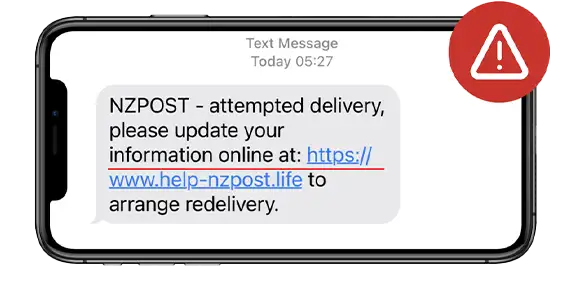
Example: NZ Post text scam
What to do
- Scam text messages: If you receive a text message that you think could be a scam, copy the message and forward it to the Department of Internal Affairs reporting system on 7726 (SPAM).
- Scam emails: Forward suspicious emails to suspicious.email@kiwibank.co.nz then delete it.
- All scam types: Call us on 0800 113 355, or send us a secure message within internet banking or the mobile app.
Malware scams: Fake apps & software downloads
Scammers are using fake apps, files and software to trick people into downloading malware onto their devices.
Malware is malicious software that can give scammers access to your device and information stored on it, including online banking details, passwords and other personal information.
They may promote these through social media, online advertisements, websites, emails, text messages or messaging apps, making them appear legitimate.
To help protect yourself:
- only download apps from trusted sources such as the App Store or Google Play
- be cautious of links, apps or software promoted through social media, advertisements or unexpected messages
- never install software or allow remote access to your device at the request of someone who contacts you unexpectedly
- keep your device and apps updated with the latest security updates.
If you think your device may be infected, disconnect it from the internet, avoid logging in to online accounts, and take steps to remove the malware. You can run a security scan or seek advice from an IT support provider or the National Cyber Security Centre. Contact us immediately if you think your banking details may have been compromised.
Investment scams: Deepfake celebrity, political endorsements & fake financial advisers
These scams use fake news stories, celebrity endorsement advertisements, and may also impersonate financial advisers or use technology to digitally alter themselves to look like someone else. They are spread through social media, websites and advertisements, to promote online investment schemes. This includes a recent scam impersonating Chief Executive Steve Jurkovich. The names of investment schemes and websites used to promote the scam change frequently. People who invest through these websites are unable to withdraw funds, with scammers requesting additional fees. They may also use aggressive sales techniques to convince people to invest.Investment scams can be hard to spot but common red flags include:
- claims of guaranteed returns or interest rates that seem too good to be true
- claims of investments with no risk – all investments come with risk
- lack of clear contact details
- request forms asking for personal and investment details
- someone contacting you out of the blue – selling investments by cold call is illegal.
For more information about deepfake video and fake celebrity investment scams, visit the Financial Markets Authority website.
Card fraud: Stolen card details in mobile wallets (Apple Pay & Google Pay™)
Scammers are using illegally obtained card details to set up cards in mobile wallets. By doing this, they can access funds and hope to avoid detection. If you receive a notification about a new debit or credit card being added to your mobile wallet that you didn’t initiate, contact us immediately. To protect yourself, check your personal details are current so we can send you a text message when a debit or credit card is added to your mobile wallet.
Helpful resources
What to do if you've been scammed
Anyone can fall for a scam. If you suspect that you've been scammed, get in touch with us as soon as possible.
24/7 support
Fraud and scam support is available around the clock. Call 0800 113 355 or +64 4 473 1133 from overseas.
0800 113 355Protect yourself
Simple actions can significantly improve your online and financial security.
What you can do