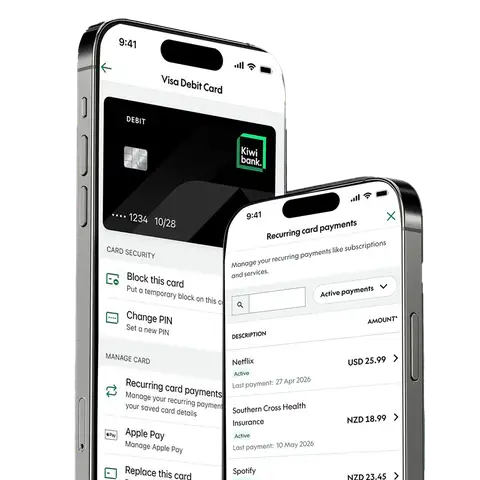
Your recurring card payments in one place
Setting up recurring card payments makes it easy to pay for subscriptions, memberships and services automatically. But keeping track of them can be difficult.
See the regular payments made with your card, all together in the Kiwibank mobile app and internet banking without having to search through your transactions.
Stay in control of your card spending
See what you’re paying for
See who’s regularly charging your personal or business card, the payment amount and how often you're charged.
New recurring card payments can take more than one payment to appear, and the amount shown may differ from what you pay as some recurring payments can vary.
Take control of your payments
Stop future recurring card payments you no longer want in the app or internet banking.
You'll still need to contact the retailer or service provider to cancel the subscription, membership or service.
Keep track of your recurring payments
We’ll remind you to review your recurring card payments, so you can stay on top of what’s charging your card and spot anything you don’t recognise.
Ready to get started?
Find recurring card payments in the Kiwibank app or internet banking under 'Cards'.
Common questions
Some recurring card payments may take time to appear. In some cases, a payment may need to be made more than once before it can be identified as recurring, and some regular payments may not be identified as recurring straight away.
You don’t need to do anything. Once a payment is identified as recurring, it’ll appear automatically.
What you see depends on the payment information we receive from Visa. This means the name or details may look different from what you expect. The information shown will continue to evolve over time.
The amount shown for a recurring card payment may not always match what you’re charged. Some recurring payments can change from one payment to the next, for example if your usual payment varies, you add something extra, or the retailer or service provider changes their price.
Check your transaction history to see the amount you were actually charged.
Stopping a recurring card payment stops future payments from being charged to your card. You'll still need to contact the retailer or service provider to cancel your subscription, membership or service.